[TIPS] How to correct HTML tags - Python
By JoeVu, at: June 9, 2024, 10:46 a.m.
Estimated Reading Time: __READING_TIME__ minutes
![[TIPS] How to correct HTML tags - Python](/media/filer_public_thumbnails/filer_public/f0/d6/f0d63c49-f021-4a0c-a0be-772ac19dbef0/html-tag.png__1500x900_q85_crop_subsampling-2_upscale.jpg)
![[TIPS] How to correct HTML tags - Python](/media/filer_public_thumbnails/filer_public/f0/d6/f0d63c49-f021-4a0c-a0be-772ac19dbef0/html-tag.png__400x240_q85_crop_subsampling-2_upscale.jpg)
To correct messed-up HTML tags using Python, you can use libraries like BeautifulSoup from the bs4 module. BeautifulSoup is powerful for parsing and fixing HTML.
Here’s a step-by-step guide on how to use it:
Step 1: Install BeautifulSoup
If you haven’t installed BeautifulSoup and lxml (a parser library), you can install them using pip:
pip install beautifulsoup4 lxml
Step 2: Use BeautifulSoup to Parse and Correct HTML
Here’s an example script that reads an HTML string, parses it with BeautifulSoup, and then outputs the corrected HTML.
from bs4 import BeautifulSoup
# Example of messed-up HTML content

messed_up_html = """ YOUR MESSY HTML CONTENT """
# Parse the HTML

soup = BeautifulSoup(messed_up_html, 'lxml')


# Pretty print the corrected HTML

corrected_html = soup.prettify()

print(corrected_html)
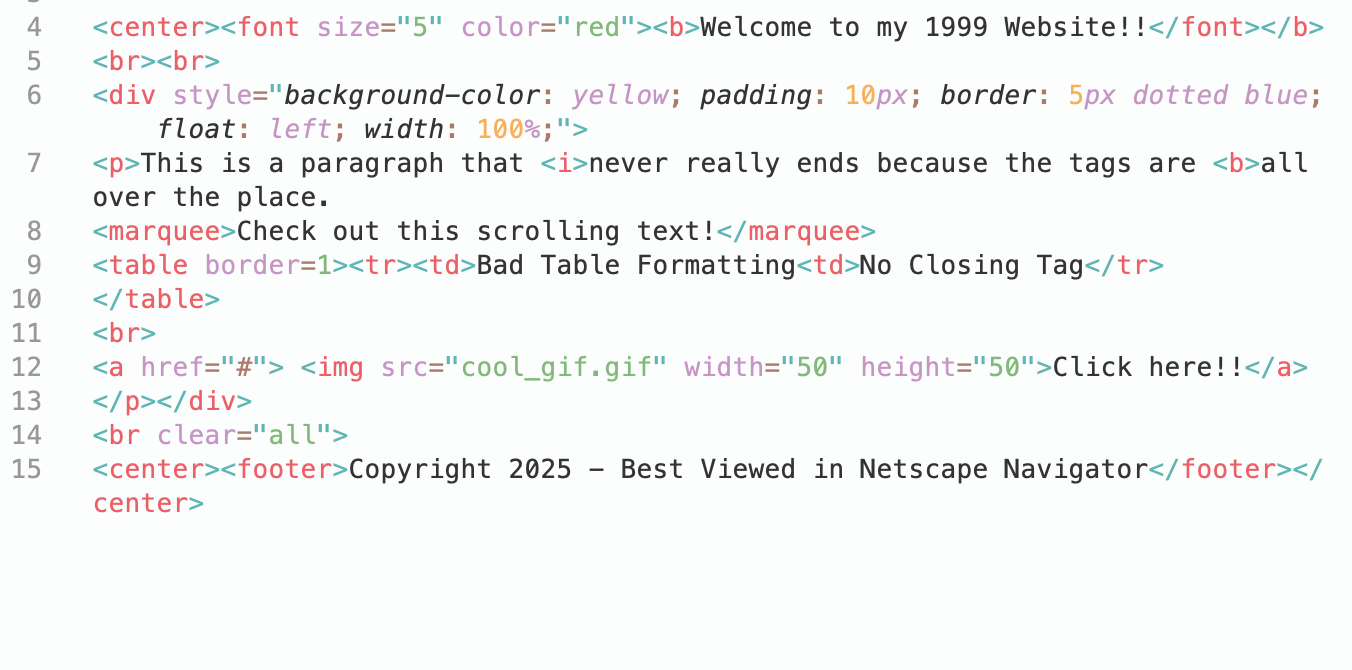
Here is messy html tags content
Explanation
- BeautifulSoup: A Python library for parsing HTML and XML documents. It creates a parse tree from page source code that can be used to extract data from HTML.
- lxml: A parser for BeautifulSoup. It is faster and more lenient with broken HTML compared to the default parser.
Output
The prettify method formats the HTML nicely. The corrected HTML will look something like this:
from bs4 import BeautifulSoup
# The messy HTML string from before

messy_html = ""
from bs4 import BeautifulSoup
# The messy HTML string from before

messy_html = """

< center>< font size="5" color="red">< b>Welcome to my 1999 Website!!< /font>< /b>

< br>< br>

< div style="background-color: yellow; padding: 10px; border: 5px dotted blue; float: left; width: 100%;">

< p>This is a paragraph that < i>never really ends because the tags are < b>all over the place.

< marquee>Check out this scrolling text!< /marquee>

< table border=1>< tr>< td>Bad Table Formatting< td>No Closing Tag< /tr>

< /table>

< br>

< a href="#"> <img src="cool_gif.gif" width="50" height="50">Click here!!< /a>

< /p></div>

< br clear="all">

< center>< footer>Copyright 2025 - Best Viewed in Netscape Navigator< /footer>< /center>

"""
# Initialize the library with the 'html.parser'

# You can also use 'lxml' for even more robust error correction

soup = BeautifulSoup(messy_html, 'html.parser')
# The .prettify() method fixes the nesting and adds indentation

clean_html = soup.prettify()
print(clean_html)
Alternatives
There are some online services for you to validate the html tags and correct them:
![[TIPs] Common Mistakes with Python Dictionaries](/media/filer_public_thumbnails/filer_public/5f/97/5f97825e-ad69-4630-9b8e-d9ad6cd1c8c5/dictionary_common_issues.png__400x240_q85_crop_subsampling-2_upscale.jpg)
![[TIPS] How to Validate IP Address Using Python](/media/filer_public_thumbnails/filer_public/0f/65/0f659496-8f3d-4505-b7de-7e95a01edc0b/ip_address_validation.png__400x240_q85_crop_subsampling-2_upscale.jpg)
![[TIPS] Python - QR Code Exploration](/media/filer_public_thumbnails/filer_public/61/fd/61fd3ace-5879-4449-bf28-9f48c34aa359/python_-_qr_code.png__400x240_q85_crop_subsampling-2_upscale.jpg)